Showing posts with label Android. Show all posts

Tuesday, March 7, 2017

How To Flashing lenovo s650

keyword : How To Flashing lenovo s650 for bootloop , How To Flashing lenovo s650 for softbrick , How To Flashing lenovo s650 for hardbrick , How To Flashing lenovo s650 Error Camera , How To Flashing lenovo s650 blank screen , How To Flashing lenovo s650 lost password , How To Flashing lenovo s650 stuck logo , How To Flashing lenovo s650 new 2017. How To Flashing lenovo s650 repair phone. How To Flashing lenovo s650 Upgrade Firmware , How To Flashing lenovo s650 via Flashtool , How To Flashing lenovo s650 for unspecified error , How To Flashing lenovo s650 mode Edl error , How To Flashing lenovo s650 bootlooader relock and unlock.

Download File Firmware and Flashtool plus Video Tutorial compressed:

do not forget there are some additional tips from me:

Further to the following stage :
1. Duplicate the document to Sd Card
2.boot into recuperation mode, in the document as of now exists as .pdf open a full instructional exercise and take after the guidelines. anybody utilizing blazing programming.
3. When've taken after the greater part of the conditions please check the telephone has been typical what is most certainly not.
4.Characteristic components EMMC highlight of blazing not harmed in the street, still can wipe information reserve. yet, introduce the upgrade shape sd card can not or won't runing.
5.booting first after introduce rom considerable lot of time of around 15 minutes. Try not to rush to evacuate the battery. hold up until the framework completes the process of booting.
critical: before doing anything on the telephone to do the information reinforcement already. can pass CMW, recuperation, twrp please find on the off chance that you lack.

How To Flashing lenovo s650

what's up guys, we are mobile networkcomparison and today we've got a full tutorial to show you how toinstall the custom vibe rom for the lenovo a850. so the vibe rom is a pretty cool customrom it's actually ported from a rom designed forthe s650 lenovo phone. it looks really coolwe'll show you some of its features and best of all it's actually a reallylightweight version so it removes all the excess apps and it doesn't even comewith any of the excess apps apart from the play store

which allows you to download whicheverones you want to choose so it's not got any bloat. it's also got root, it fixes some errorsin translation in some of the applications and allows you to move apps betweenyour data partition and your external sd card. and you can use busyboxon it as well. so overall it's just a great alternative to defaultroms available for this phone the way we're going to install this rom isvia a custom recovery but to get to thatstage we actually have to change the existing rom on the phone

by flashing a new rom across. it's a bitcomplicated because the rest of world (row) rom that the phone comes with isn't thecorrect base to flash across a new rom via recovery so we have to get a different rom acrossfirst before we can do it. but this tutorial will show you exactly whatyou have to do at all stages. and the first step is to just turn off the phone. power it offcompletely and take the battery out. then you're ready to you get started andflash the first rom across with the flashtool.in order to flash the new rom

you need three things. you need to havethe usb drivers installed in your computer so it can see your phone. you need to have the flashtoolapplication. and of course need the rom file itself. so if you click on the descriptionbelow, we've got a link that will take you to our site where we have all these things preparedfor you. so we've got a zip file with the flashtool and the usbdrivers inside it. we've a zip file with the rom inside it.and we've also got usbdview

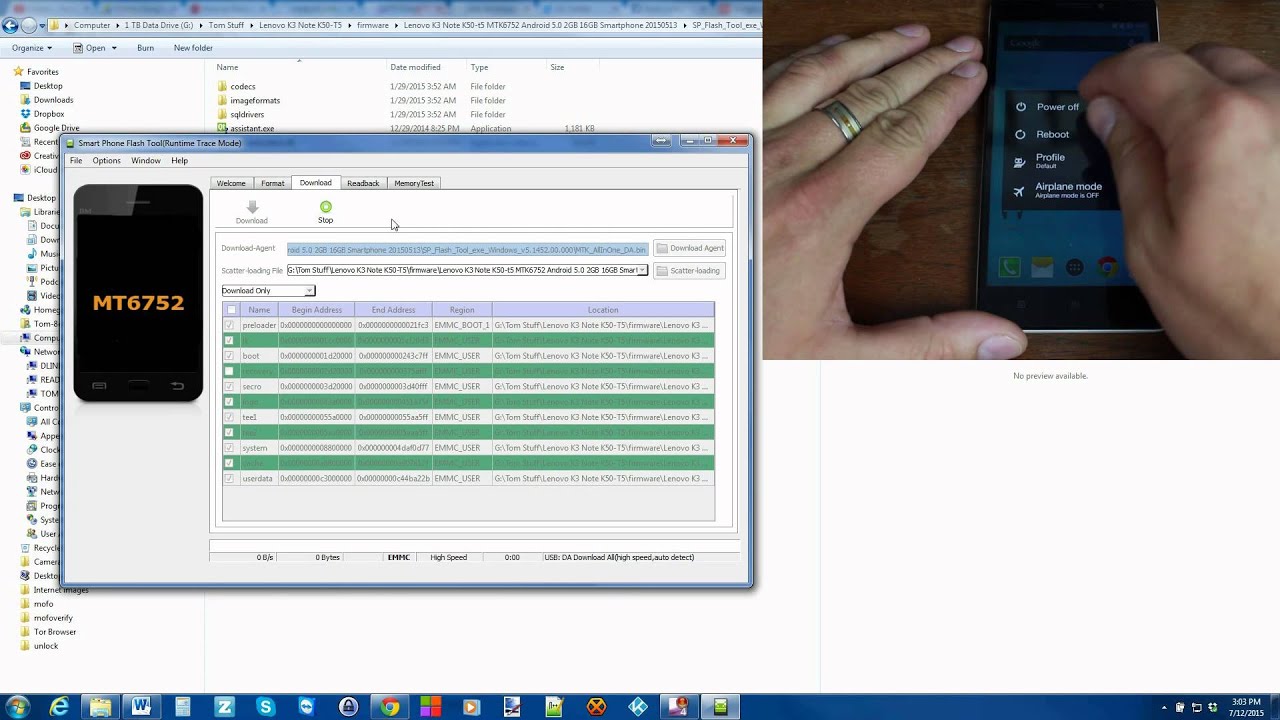
should you need it if you're havingtrouble installing the usb drivers. so once you've got all that sortedyou're ready to start the flashing process. go to your computer, navigate to the flashtoolfolder. and then just go ahead. we;re going to run theflashtool executable. so double-click it, hit run, and it will openup. once it's loaded up on your screen, the firststep is to load the scatter file. so just click here and then double-click on thescatter text file that was included in your rom dump. which you have unzipped somewhereon your computer.

and then we need to check this box that says"da/dl all with checksum". that's very important.and just check some options before we start it. so check usb mode is on and check that the speed is set to highspeed. so before we go ahead, never ever pressthis format button. be really careful you always want to click the firmware upgradebutton or hit f8. once you hit that you'll see "searching"appears at the bottom and it's ready for you to go ahead andplug in your phone to the usb cable. so i've plugged the phone and i'm going toquickly fast-forward through

all of the rom being loaded onto thephone. so we actually have a complete tutorialvideo just for flashing this first rom across. and if you've already followed that then youdon't need to follow this step. you can skip straight to booting intorecovery and flashing the vibe rom across. just make sure before you boot intorecovery that you've copied the vibe rom zip on your phone somewhereso you have somewhere to install it from. it shouldn't take too long at all. you'reprobably looking at a total time in the regional of about five, six or sevenminutes once everything's done. as long as you're seeing coloured progressbars

along the bottom, everything's runningfine. you just need to make sure you've got a decent usb cable that's reliableand that will last without any problems. so now we've got to theend of the flashing process here, this big green circle means everything's done correctly. you can close it. close the flashtool andthen unplug your phone. so now this is done you can either boot intothe rom itself (which will take a little while) and from there you something like mobileuncletools to boot into recovery. or do what we're doing which isholding down the power key and the two

volume keys from power off. and that'll boot us straightinto recovery where we can begin flashing the vibe rom. so once we're into recovery we can justnavigate through the menus by using the volume keys to go up and down. and thepower key to enter our choices. we need to go to "install zip from sd card"and select that option and then we can choose "choose zip fromsd card" and navigate to the zip file. press"yes" to confirm our choice. and it will begin flashing across. so i'm just going to fast forward through this

process. it's actually pretty quickflashing a rom across from a zip. it's just going to copy all the files across,unzip everything and make sure everything's flashed to your phone. so before we actually attempt to boot upinto the rom, we just need to do some housekeeping to check its going toboot up correctly the first time. you want to just choose "go back" and thennavigate to the option saying "wipe data/factory reset". press "yes" onthat. it'll take just a few seconds just to wipethese couple of partitions.

and just to be sure we're also going towipe the cache partition manually by selecting that and pressing "yes wipecache" and finally going to the advanced menus and "wipe the dalvik cache" as well. and once that's all done we're to go back to themain menu. press "reboot system now". and check out our new vibe rom. so asalways, the first boot takes a little bit longer than usual. but, it shouldn't be too long at all. and beforeyou know it, you'll be using your phone

with your newly installed custom rom. just give me a second while the phone boots up. i'm just going to fast-forward through thisbecause it takes about 30 seconds. we've done and it's going to start loading the desktop forthe vibe rom. so as you can see looks quite a bitdifferent from the last rom we had installed on this lenovo a850.before we get started we've got to just quickly accept the licenseagreement. so just scroll down to the bottom and hit this "accept" button there. and i'm gonna skip the settings wizardthis time. and this is what the rom

looks like. so you'll notice that we've got rootautomatically as well as these quick settings icons in the notification drawer which give youquick and easy access to various settings and options. so let's go forward and have a look at the settings pages. again it's split over three pages and ifwe scroll down to the bottom here and have a look at about phone you can seethe version info.

and we are running vibe rom version 1.0 the phone comes with various toolsinstalled and a minimal amount of apps. let's look at the messaging interface. so it's a little bitdifferent from the other0:07:07.389,1193:02:47.295 lenovo interface. as is the contacts. andthe dialler is nice and clean and easy to use and looks pretty good actually. as we mentioned earlier, it includes thegoogle play store but no other google apps. so you have the choice of whether youwant to install them or not. and unfortunately,

one of the biggest flaws with this rom atthe moment - as it's still in development - the cameradoesn't work and nor does the gps. so you just get this green screen here. but let's go and look at thosesettings again. so you've got all the normal options here like wifi, brightness, wallpaper... some featuresettings and, of course, settings like settingup mobile networks and all the other things that come withlenovo phones. the great thing about the vibe rom:

you can finally move apps to the sd card.really really useful. and we've still got the fantastic simmanagement software which allows you to use to the dual-sim capability. as well as that, we've also got"scheduled power on and off" in the settings which is a really usefulfeature. and again, let me to show you some of thesetools. so for example the clock. again pretty standard android clock. and alittle bit more about these quick settings options. so you can scroll backwardsand forwards between them. and it's even got a quick settingspanel which - let me just activate that -

and that gives you even more settings tochoose from all at once in a quick and easy way not having tonavigate the menus. vibe also comes with a theme suite which is its way of allowing you tocustomize the look and feel of your phone in quite an easy way. so you there's ahandful choices here for you to pick from. and they actually quite drasticallychange how all aspects of the interface appears to you. let's have a look at what thisone looks like. go back to the home screen and you can see

it's completely changed. let's pickanother theme to see how that looks. and this one looks quite fun. justquickly activate it. and this is what it's supposed to look like. and you can see evenall the icons are styled in a new way. so that's been our tutorialto installing the vibe custom rom on the lenovo a850. as usual all the details, full explanations for what to do, andlinks to all the downloads you need will be in the description below justbelow that thumbs up button. thanks again for watching, we hope it'sbeen useful. please please let us know how you get on.

and we're also really interested to hear whatyou want to see from us in the future. so whether that's more unboxings, more reviews,rom install tutorials, or anything else, please just let us knowwith a comment. and subscribe to check out more of our video in the future. cheers :)

How To Flashing lenovo s60 a

keyword : How To Flashing lenovo s60 a for bootloop , How To Flashing lenovo s60 a for softbrick , How To Flashing lenovo s60 a for hardbrick , How To Flashing lenovo s60 a Error Camera , How To Flashing lenovo s60 a blank screen , How To Flashing lenovo s60 a lost password , How To Flashing lenovo s60 a stuck logo , How To Flashing lenovo s60 a new 2017. How To Flashing lenovo s60 a repair phone. How To Flashing lenovo s60 a Upgrade Firmware , How To Flashing lenovo s60 a via Flashtool , How To Flashing lenovo s60 a for unspecified error , How To Flashing lenovo s60 a mode Edl error , How To Flashing lenovo s60 a bootlooader relock and unlock.

Download File Firmware and Flashtool plus Video Tutorial compressed:

do not forget there are some additional tips from me:

Further to the following stage :
1. Duplicate the document to Sd Card
2.boot into recuperation mode, in the document as of now exists as .pdf open a full instructional exercise and take after the guidelines. anybody utilizing blazing programming.
3. When've taken after the greater part of the conditions please check the telephone has been typical what is most certainly not.
4.Characteristic components EMMC highlight of blazing not harmed in the street, still can wipe information reserve. yet, introduce the upgrade shape sd card can not or won't runing.
5.booting first after introduce rom considerable lot of time of around 15 minutes. Try not to rush to evacuate the battery. hold up until the framework completes the process of booting.
critical: before doing anything on the telephone to do the information reinforcement already. can pass CMW, recuperation, twrp please find on the off chance that you lack.

How To Flashing lenovo s60 a

hello and welcome! dear subscribers, and viewers of our channel, we glad to offer you a new video in which we look at how to disassemble ðÿ“± lenovo s856

How To Flashing lenovo s580

keyword : How To Flashing lenovo s580 for bootloop , How To Flashing lenovo s580 for softbrick , How To Flashing lenovo s580 for hardbrick , How To Flashing lenovo s580 Error Camera , How To Flashing lenovo s580 blank screen , How To Flashing lenovo s580 lost password , How To Flashing lenovo s580 stuck logo , How To Flashing lenovo s580 new 2017. How To Flashing lenovo s580 repair phone. How To Flashing lenovo s580 Upgrade Firmware , How To Flashing lenovo s580 via Flashtool , How To Flashing lenovo s580 for unspecified error , How To Flashing lenovo s580 mode Edl error , How To Flashing lenovo s580 bootlooader relock and unlock.

Download File Firmware and Flashtool plus Video Tutorial compressed:

do not forget there are some additional tips from me:

Further to the following stage :
1. Duplicate the document to Sd Card
2.boot into recuperation mode, in the document as of now exists as .pdf open a full instructional exercise and take after the guidelines. anybody utilizing blazing programming.
3. When've taken after the greater part of the conditions please check the telephone has been typical what is most certainly not.
4.Characteristic components EMMC highlight of blazing not harmed in the street, still can wipe information reserve. yet, introduce the upgrade shape sd card can not or won't runing.
5.booting first after introduce rom considerable lot of time of around 15 minutes. Try not to rush to evacuate the battery. hold up until the framework completes the process of booting.
critical: before doing anything on the telephone to do the information reinforcement already. can pass CMW, recuperation, twrp please find on the off chance that you lack.

How To Flashing lenovo s580

hello and welcome! dear subscribers, and viewers of our channel, we glad to offer you a new video in which we look at how to disassemble ðÿ“± philips s388

How To Flashing lenovo s560

keyword : How To Flashing lenovo s560 for bootloop , How To Flashing lenovo s560 for softbrick , How To Flashing lenovo s560 for hardbrick , How To Flashing lenovo s560 Error Camera , How To Flashing lenovo s560 blank screen , How To Flashing lenovo s560 lost password , How To Flashing lenovo s560 stuck logo , How To Flashing lenovo s560 new 2017. How To Flashing lenovo s560 repair phone. How To Flashing lenovo s560 Upgrade Firmware , How To Flashing lenovo s560 via Flashtool , How To Flashing lenovo s560 for unspecified error , How To Flashing lenovo s560 mode Edl error , How To Flashing lenovo s560 bootlooader relock and unlock.

Download File Firmware and Flashtool plus Video Tutorial compressed:

do not forget there are some additional tips from me:

Further to the following stage :
1. Duplicate the document to Sd Card
2.boot into recuperation mode, in the document as of now exists as .pdf open a full instructional exercise and take after the guidelines. anybody utilizing blazing programming.
3. When've taken after the greater part of the conditions please check the telephone has been typical what is most certainly not.
4.Characteristic components EMMC highlight of blazing not harmed in the street, still can wipe information reserve. yet, introduce the upgrade shape sd card can not or won't runing.
5.booting first after introduce rom considerable lot of time of around 15 minutes. Try not to rush to evacuate the battery. hold up until the framework completes the process of booting.
critical: before doing anything on the telephone to do the information reinforcement already. can pass CMW, recuperation, twrp please find on the off chance that you lack.

How To Flashing lenovo s560

okay hi this is lenovo a529 a529 sorry you can't see it very can you see okay whatever this is review scroll like this oopps! sorry

xd it look like this give me it too beautiful anyway i use it clean it done them i don't know how to say english you see okay

how to delete or clean click setting they seem storage i forgot yeah here click this and then click format sd card

first click this and then it can del all

How To Flashing lenovo p780

keyword : How To Flashing lenovo p780 for bootloop , How To Flashing lenovo p780 for softbrick , How To Flashing lenovo p780 for hardbrick , How To Flashing lenovo p780 Error Camera , How To Flashing lenovo p780 blank screen , How To Flashing lenovo p780 lost password , How To Flashing lenovo p780 stuck logo , How To Flashing lenovo p780 new 2017. How To Flashing lenovo p780 repair phone. How To Flashing lenovo p780 Upgrade Firmware , How To Flashing lenovo p780 via Flashtool , How To Flashing lenovo p780 for unspecified error , How To Flashing lenovo p780 mode Edl error , How To Flashing lenovo p780 bootlooader relock and unlock.

Download File Firmware and Flashtool plus Video Tutorial compressed:

do not forget there are some additional tips from me:

Further to the following stage :
1. Duplicate the document to Sd Card
2.boot into recuperation mode, in the document as of now exists as .pdf open a full instructional exercise and take after the guidelines. anybody utilizing blazing programming.
3. When've taken after the greater part of the conditions please check the telephone has been typical what is most certainly not.
4.Characteristic components EMMC highlight of blazing not harmed in the street, still can wipe information reserve. yet, introduce the upgrade shape sd card can not or won't runing.
5.booting first after introduce rom considerable lot of time of around 15 minutes. Try not to rush to evacuate the battery. hold up until the framework completes the process of booting.
critical: before doing anything on the telephone to do the information reinforcement already. can pass CMW, recuperation, twrp please find on the off chance that you lack.

How To Flashing lenovo p780

hello and welcome! dear subscribers, and viewers of our channel, we glad to offer you a new video in which we look at how to disassemble ðÿ“± lenovo p780

How To Flashing lenovo p770

keyword : How To Flashing lenovo p770 for bootloop , How To Flashing lenovo p770 for softbrick , How To Flashing lenovo p770 for hardbrick , How To Flashing lenovo p770 Error Camera , How To Flashing lenovo p770 blank screen , How To Flashing lenovo p770 lost password , How To Flashing lenovo p770 stuck logo , How To Flashing lenovo p770 new 2017. How To Flashing lenovo p770 repair phone. How To Flashing lenovo p770 Upgrade Firmware , How To Flashing lenovo p770 via Flashtool , How To Flashing lenovo p770 for unspecified error , How To Flashing lenovo p770 mode Edl error , How To Flashing lenovo p770 bootlooader relock and unlock.

Download File Firmware and Flashtool plus Video Tutorial compressed:

do not forget there are some additional tips from me:

Further to the following stage :
1. Duplicate the document to Sd Card
2.boot into recuperation mode, in the document as of now exists as .pdf open a full instructional exercise and take after the guidelines. anybody utilizing blazing programming.
3. When've taken after the greater part of the conditions please check the telephone has been typical what is most certainly not.
4.Characteristic components EMMC highlight of blazing not harmed in the street, still can wipe information reserve. yet, introduce the upgrade shape sd card can not or won't runing.
5.booting first after introduce rom considerable lot of time of around 15 minutes. Try not to rush to evacuate the battery. hold up until the framework completes the process of booting.
critical: before doing anything on the telephone to do the information reinforcement already. can pass CMW, recuperation, twrp please find on the off chance that you lack.

How To Flashing lenovo p770

hello and welcome! dear subscribers, and viewers of our channel, we glad to offer you a new video in which we look at how to disassemble ðÿ“± lenovo p770

How To Flashing lenovo p700i

keyword : How To Flashing lenovo p700i for bootloop , How To Flashing lenovo p700i for softbrick , How To Flashing lenovo p700i for hardbrick , How To Flashing lenovo p700i Error Camera , How To Flashing lenovo p700i blank screen , How To Flashing lenovo p700i lost password , How To Flashing lenovo p700i stuck logo , How To Flashing lenovo p700i new 2017. How To Flashing lenovo p700i repair phone. How To Flashing lenovo p700i Upgrade Firmware , How To Flashing lenovo p700i via Flashtool , How To Flashing lenovo p700i for unspecified error , How To Flashing lenovo p700i mode Edl error , How To Flashing lenovo p700i bootlooader relock and unlock.

Download File Firmware and Flashtool plus Video Tutorial compressed:

do not forget there are some additional tips from me:

Further to the following stage :
1. Duplicate the document to Sd Card
2.boot into recuperation mode, in the document as of now exists as .pdf open a full instructional exercise and take after the guidelines. anybody utilizing blazing programming.
3. When've taken after the greater part of the conditions please check the telephone has been typical what is most certainly not.
4.Characteristic components EMMC highlight of blazing not harmed in the street, still can wipe information reserve. yet, introduce the upgrade shape sd card can not or won't runing.
5.booting first after introduce rom considerable lot of time of around 15 minutes. Try not to rush to evacuate the battery. hold up until the framework completes the process of booting.
critical: before doing anything on the telephone to do the information reinforcement already. can pass CMW, recuperation, twrp please find on the off chance that you lack.

How To Flashing lenovo p700i

samsung galaxy camera "photo shoot" and "on/off" button "flash light" button user informations power plug battery wrist band earphone ear-bud

usb cable

How To Flashing lenovo p70 a

keyword : How To Flashing lenovo p70 a for bootloop , How To Flashing lenovo p70 a for softbrick , How To Flashing lenovo p70 a for hardbrick , How To Flashing lenovo p70 a Error Camera , How To Flashing lenovo p70 a blank screen , How To Flashing lenovo p70 a lost password , How To Flashing lenovo p70 a stuck logo , How To Flashing lenovo p70 a new 2017. How To Flashing lenovo p70 a repair phone. How To Flashing lenovo p70 a Upgrade Firmware , How To Flashing lenovo p70 a via Flashtool , How To Flashing lenovo p70 a for unspecified error , How To Flashing lenovo p70 a mode Edl error , How To Flashing lenovo p70 a bootlooader relock and unlock.

Download File Firmware and Flashtool plus Video Tutorial compressed:

do not forget there are some additional tips from me:

Further to the following stage :
1. Duplicate the document to Sd Card
2.boot into recuperation mode, in the document as of now exists as .pdf open a full instructional exercise and take after the guidelines. anybody utilizing blazing programming.
3. When've taken after the greater part of the conditions please check the telephone has been typical what is most certainly not.
4.Characteristic components EMMC highlight of blazing not harmed in the street, still can wipe information reserve. yet, introduce the upgrade shape sd card can not or won't runing.
5.booting first after introduce rom considerable lot of time of around 15 minutes. Try not to rush to evacuate the battery. hold up until the framework completes the process of booting.
critical: before doing anything on the telephone to do the information reinforcement already. can pass CMW, recuperation, twrp please find on the off chance that you lack.

How To Flashing lenovo p70 a

your lenovo laptop doesn’t power-up? hereare few simple steps that you could try by yourself to resolve the problem.if your system is running on battery mode, make sure the battery is not loose and isseated properly. there is a possibility that the battery might have drained completely.to check, try connecting to a power source through an ac adapter. if it is already connected,make sure the connections are firm and secure. you could change to a different wall outletto rule out the possibility of a faulty power outlet. swap the ac adapter with another onethat is known to be in a working condition. if these steps have been performed and thesystem is still not powering up, then remove all peripherals like printer, mouse or anyother devices. press the power button to check

if there is any sign of power. it could be• the on status of the led indicator • sound of a spinning fan• or sound of a spinning hard drive if your system has an optical disc drive,press the eject button to see if the drive tray ejects.if there is no sign of power, then we could try draining the flea power. flea power orresidual power is the current that is often stored in the electronic circuit boards whichmay prevent the system from powering on. to drain the flea power, remove all the powersources like the ac adaptor and batteries. sometimes your system may come with a built-inbattery which cannot be removed. that’s fine, but if it is a detachable one, thenremove it.

press and hold the power button for five seconds.connect the battery and the ac adapter and try powering on. if it still doesn’t work,then it might need additional troubleshooting. you could press the novo button on your laptopto see if the system starts. novo button is a small circular button usually near the powerbutton or on the left side of the laptop. it is provided to recover your operating systemin case of os failure. if the system powers on by using the novo button, select the option“normal startup” in the novo button menu to continue using your computer. this isolatesthe problem to be with the power button. call your technical support to get further assistance.but trying these simple steps before you call could save a lot of your time. thank you.

How To Flashing lenovo k910l

keyword : How To Flashing lenovo k910l for bootloop , How To Flashing lenovo k910l for softbrick , How To Flashing lenovo k910l for hardbrick , How To Flashing lenovo k910l Error Camera , How To Flashing lenovo k910l blank screen , How To Flashing lenovo k910l lost password , How To Flashing lenovo k910l stuck logo , How To Flashing lenovo k910l new 2017. How To Flashing lenovo k910l repair phone. How To Flashing lenovo k910l Upgrade Firmware , How To Flashing lenovo k910l via Flashtool , How To Flashing lenovo k910l for unspecified error , How To Flashing lenovo k910l mode Edl error , How To Flashing lenovo k910l bootlooader relock and unlock.

Download File Firmware and Flashtool plus Video Tutorial compressed:

do not forget there are some additional tips from me:

Further to the following stage :
1. Duplicate the document to Sd Card
2.boot into recuperation mode, in the document as of now exists as .pdf open a full instructional exercise and take after the guidelines. anybody utilizing blazing programming.
3. When've taken after the greater part of the conditions please check the telephone has been typical what is most certainly not.
4.Characteristic components EMMC highlight of blazing not harmed in the street, still can wipe information reserve. yet, introduce the upgrade shape sd card can not or won't runing.
5.booting first after introduce rom considerable lot of time of around 15 minutes. Try not to rush to evacuate the battery. hold up until the framework completes the process of booting.
critical: before doing anything on the telephone to do the information reinforcement already. can pass CMW, recuperation, twrp please find on the off chance that you lack.

How To Flashing lenovo k910l

how to root any android phone or device

How To Flashing lenovo k910e

keyword : How To Flashing lenovo k910e for bootloop , How To Flashing lenovo k910e for softbrick , How To Flashing lenovo k910e for hardbrick , How To Flashing lenovo k910e Error Camera , How To Flashing lenovo k910e blank screen , How To Flashing lenovo k910e lost password , How To Flashing lenovo k910e stuck logo , How To Flashing lenovo k910e new 2017. How To Flashing lenovo k910e repair phone. How To Flashing lenovo k910e Upgrade Firmware , How To Flashing lenovo k910e via Flashtool , How To Flashing lenovo k910e for unspecified error , How To Flashing lenovo k910e mode Edl error , How To Flashing lenovo k910e bootlooader relock and unlock.

Download File Firmware and Flashtool plus Video Tutorial compressed:

do not forget there are some additional tips from me:

Further to the following stage :
1. Duplicate the document to Sd Card
2.boot into recuperation mode, in the document as of now exists as .pdf open a full instructional exercise and take after the guidelines. anybody utilizing blazing programming.
3. When've taken after the greater part of the conditions please check the telephone has been typical what is most certainly not.
4.Characteristic components EMMC highlight of blazing not harmed in the street, still can wipe information reserve. yet, introduce the upgrade shape sd card can not or won't runing.
5.booting first after introduce rom considerable lot of time of around 15 minutes. Try not to rush to evacuate the battery. hold up until the framework completes the process of booting.
critical: before doing anything on the telephone to do the information reinforcement already. can pass CMW, recuperation, twrp please find on the off chance that you lack.

How To Flashing lenovo k910e

hello and welcome! dear subscribers, and viewers of our channel, we glad to offer you a new video in which we look at how to disassemble ðÿ“± lenovo vibe z k910

How To Flashing lenovo k910

keyword : How To Flashing lenovo k910 for bootloop , How To Flashing lenovo k910 for softbrick , How To Flashing lenovo k910 for hardbrick , How To Flashing lenovo k910 Error Camera , How To Flashing lenovo k910 blank screen , How To Flashing lenovo k910 lost password , How To Flashing lenovo k910 stuck logo , How To Flashing lenovo k910 new 2017. How To Flashing lenovo k910 repair phone. How To Flashing lenovo k910 Upgrade Firmware , How To Flashing lenovo k910 via Flashtool , How To Flashing lenovo k910 for unspecified error , How To Flashing lenovo k910 mode Edl error , How To Flashing lenovo k910 bootlooader relock and unlock.

Download File Firmware and Flashtool plus Video Tutorial compressed:

do not forget there are some additional tips from me:

Further to the following stage :
1. Duplicate the document to Sd Card
2.boot into recuperation mode, in the document as of now exists as .pdf open a full instructional exercise and take after the guidelines. anybody utilizing blazing programming.
3. When've taken after the greater part of the conditions please check the telephone has been typical what is most certainly not.
4.Characteristic components EMMC highlight of blazing not harmed in the street, still can wipe information reserve. yet, introduce the upgrade shape sd card can not or won't runing.
5.booting first after introduce rom considerable lot of time of around 15 minutes. Try not to rush to evacuate the battery. hold up until the framework completes the process of booting.
critical: before doing anything on the telephone to do the information reinforcement already. can pass CMW, recuperation, twrp please find on the off chance that you lack.

How To Flashing lenovo k910

received theme center "uninstall harmful app" notification and you pressed ok then your theme center will be disable and you won't be able to change themes and wallpaper from setting-> display menu if you try to open wallpaper menu then system prompt you a strange error "unfortunately, the process com.android.setting has stopped." lock screen -> lock screen theme also disabled if you try to search "theme center app" then your search return zero result because this app is disabled solution -> go to settings then apps, find theme center app and then press force stop press back button and you are in same menu settings-> apps, in the bottom press more [three dot button] and press reset app preferences now try to open wallpaper from settings-> display-> wallpaper and grant permissions now search theme center app in the menu

open theme center and grant permissions, thank you !!

How To Flashing lenovo k900

keyword : How To Flashing lenovo k900 for bootloop , How To Flashing lenovo k900 for softbrick , How To Flashing lenovo k900 for hardbrick , How To Flashing lenovo k900 Error Camera , How To Flashing lenovo k900 blank screen , How To Flashing lenovo k900 lost password , How To Flashing lenovo k900 stuck logo , How To Flashing lenovo k900 new 2017. How To Flashing lenovo k900 repair phone. How To Flashing lenovo k900 Upgrade Firmware , How To Flashing lenovo k900 via Flashtool , How To Flashing lenovo k900 for unspecified error , How To Flashing lenovo k900 mode Edl error , How To Flashing lenovo k900 bootlooader relock and unlock.

Download File Firmware and Flashtool plus Video Tutorial compressed:

do not forget there are some additional tips from me:

Further to the following stage :
1. Duplicate the document to Sd Card
2.boot into recuperation mode, in the document as of now exists as .pdf open a full instructional exercise and take after the guidelines. anybody utilizing blazing programming.
3. When've taken after the greater part of the conditions please check the telephone has been typical what is most certainly not.
4.Characteristic components EMMC highlight of blazing not harmed in the street, still can wipe information reserve. yet, introduce the upgrade shape sd card can not or won't runing.
5.booting first after introduce rom considerable lot of time of around 15 minutes. Try not to rush to evacuate the battery. hold up until the framework completes the process of booting.
critical: before doing anything on the telephone to do the information reinforcement already. can pass CMW, recuperation, twrp please find on the off chance that you lack.

How To Flashing lenovo k900

hello and welcome! dear subscribers, and viewers of our channel, we glad to offer you a new video in which we look at how to disassemble ðÿ“± lenovo vibe x2 (x2pa3)

How To Flashing lenovo k3 note

keyword : How To Flashing lenovo k3 note for bootloop , How To Flashing lenovo k3 note for softbrick , How To Flashing lenovo k3 note for hardbrick , How To Flashing lenovo k3 note Error Camera , How To Flashing lenovo k3 note blank screen , How To Flashing lenovo k3 note lost password , How To Flashing lenovo k3 note stuck logo , How To Flashing lenovo k3 note new 2017. How To Flashing lenovo k3 note repair phone. How To Flashing lenovo k3 note Upgrade Firmware , How To Flashing lenovo k3 note via Flashtool , How To Flashing lenovo k3 note for unspecified error , How To Flashing lenovo k3 note mode Edl error , How To Flashing lenovo k3 note bootlooader relock and unlock.

Download File Firmware and Flashtool plus Video Tutorial compressed:

do not forget there are some additional tips from me:

Further to the following stage :
1. Duplicate the document to Sd Card
2.boot into recuperation mode, in the document as of now exists as .pdf open a full instructional exercise and take after the guidelines. anybody utilizing blazing programming.
3. When've taken after the greater part of the conditions please check the telephone has been typical what is most certainly not.
4.Characteristic components EMMC highlight of blazing not harmed in the street, still can wipe information reserve. yet, introduce the upgrade shape sd card can not or won't runing.
5.booting first after introduce rom considerable lot of time of around 15 minutes. Try not to rush to evacuate the battery. hold up until the framework completes the process of booting.
critical: before doing anything on the telephone to do the information reinforcement already. can pass CMW, recuperation, twrp please find on the off chance that you lack.

How To Flashing lenovo k3 note

if you have lenovo k3 note k50a40 is hanging or you forgot your phone lock in k50-t5 or any other hard reset issue then you can perform this to solve your hanging issue in your a7000 turbo this is called hard reset and this lenovo k3 note is also known as a7000 turbo in india so what you have to do is you have to power off your phone by pressing power button or removing battery

in lenovo k50-t5 k50-t5 press volume up button and power button for ten second untill your phone boots into recovery mode now here k50-t5 k50-t5 booted into recovery mode and you have to select third last option wipe emmc scroll with vol down to select and conform with power button now this wil start format n your phone and all data would be clear this will take time according to your data in in your k50-t5 k50-t5

please back up your data befor hard reser and your phone lock will be bypass hanging issue would resolve and if you want to takecare of your mobile by better way then subscribe to channel its free

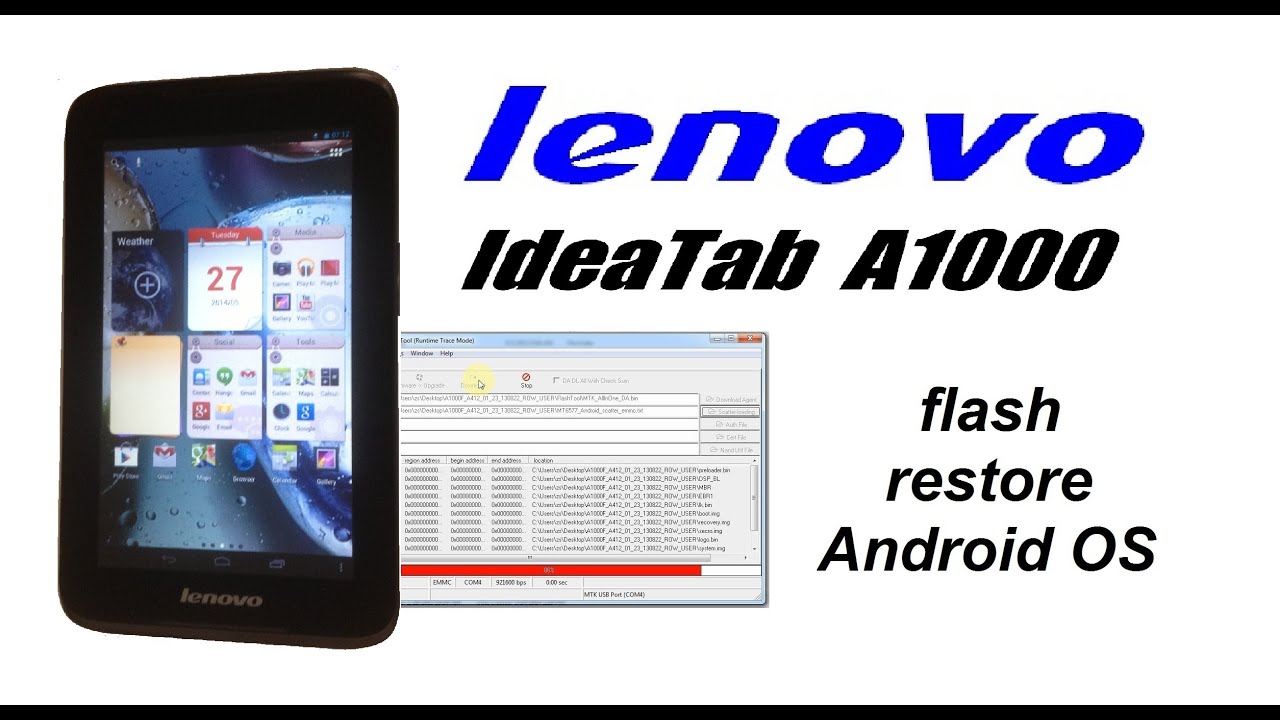
How To Flashing lenovo ideatab a1000 f

keyword : How To Flashing lenovo ideatab a1000 f for bootloop , How To Flashing lenovo ideatab a1000 f for softbrick , How To Flashing lenovo ideatab a1000 f for hardbrick , How To Flashing lenovo ideatab a1000 f Error Camera , How To Flashing lenovo ideatab a1000 f blank screen , How To Flashing lenovo ideatab a1000 f lost password , How To Flashing lenovo ideatab a1000 f stuck logo , How To Flashing lenovo ideatab a1000 f new 2017. How To Flashing lenovo ideatab a1000 f repair phone. How To Flashing lenovo ideatab a1000 f Upgrade Firmware , How To Flashing lenovo ideatab a1000 f via Flashtool , How To Flashing lenovo ideatab a1000 f for unspecified error , How To Flashing lenovo ideatab a1000 f mode Edl error , How To Flashing lenovo ideatab a1000 f bootlooader relock and unlock.

Download File Firmware and Flashtool plus Video Tutorial compressed:

do not forget there are some additional tips from me:

Further to the following stage :
1. Duplicate the document to Sd Card
2.boot into recuperation mode, in the document as of now exists as .pdf open a full instructional exercise and take after the guidelines. anybody utilizing blazing programming.
3. When've taken after the greater part of the conditions please check the telephone has been typical what is most certainly not.
4.Characteristic components EMMC highlight of blazing not harmed in the street, still can wipe information reserve. yet, introduce the upgrade shape sd card can not or won't runing.
5.booting first after introduce rom considerable lot of time of around 15 minutes. Try not to rush to evacuate the battery. hold up until the framework completes the process of booting.
critical: before doing anything on the telephone to do the information reinforcement already. can pass CMW, recuperation, twrp please find on the off chance that you lack.

How To Flashing lenovo ideatab a1000 f

[benq faq] how to copy av (audio & video) data from jm-250? please follow the illustrations step by step

How To Flashing lenovo a916

keyword : How To Flashing lenovo a916 for bootloop , How To Flashing lenovo a916 for softbrick , How To Flashing lenovo a916 for hardbrick , How To Flashing lenovo a916 Error Camera , How To Flashing lenovo a916 blank screen , How To Flashing lenovo a916 lost password , How To Flashing lenovo a916 stuck logo , How To Flashing lenovo a916 new 2017. How To Flashing lenovo a916 repair phone. How To Flashing lenovo a916 Upgrade Firmware , How To Flashing lenovo a916 via Flashtool , How To Flashing lenovo a916 for unspecified error , How To Flashing lenovo a916 mode Edl error , How To Flashing lenovo a916 bootlooader relock and unlock.

Download File Firmware and Flashtool plus Video Tutorial compressed:

do not forget there are some additional tips from me:

Further to the following stage :
1. Duplicate the document to Sd Card
2.boot into recuperation mode, in the document as of now exists as .pdf open a full instructional exercise and take after the guidelines. anybody utilizing blazing programming.
3. When've taken after the greater part of the conditions please check the telephone has been typical what is most certainly not.
4.Characteristic components EMMC highlight of blazing not harmed in the street, still can wipe information reserve. yet, introduce the upgrade shape sd card can not or won't runing.
5.booting first after introduce rom considerable lot of time of around 15 minutes. Try not to rush to evacuate the battery. hold up until the framework completes the process of booting.
critical: before doing anything on the telephone to do the information reinforcement already. can pass CMW, recuperation, twrp please find on the off chance that you lack.

How To Flashing lenovo a916

what's up guys, we are mobile networkcomparison and today we've got a full tutorial to show you how toinstall the custom vibe rom for the lenovo a850. so the vibe rom is a pretty cool customrom it's actually ported from a rom designed forthe s650 lenovo phone. it looks really coolwe'll show you some of its features and best of all it's actually a reallylightweight version so it removes all the excess apps and it doesn't even comewith any of the excess apps apart from the play store

which allows you to download whicheverones you want to choose so it's not got any bloat. it's also got root, it fixes some errorsin translation in some of the applications and allows you to move apps betweenyour data partition and your external sd card. and you can use busyboxon it as well. so overall it's just a great alternative to defaultroms available for this phone the way we're going to install this rom isvia a custom recovery but to get to thatstage we actually have to change the existing rom on the phone

by flashing a new rom across. it's a bitcomplicated because the rest of world (row) rom that the phone comes with isn't thecorrect base to flash across a new rom via recovery so we have to get a different rom acrossfirst before we can do it. but this tutorial will show you exactly whatyou have to do at all stages. and the first step is to just turn off the phone. power it offcompletely and take the battery out. then you're ready to you get started andflash the first rom across with the flashtool.in order to flash the new rom

you need three things. you need to havethe usb drivers installed in your computer so it can see your phone. you need to have the flashtoolapplication. and of course need the rom file itself. so if you click on the descriptionbelow, we've got a link that will take you to our site where we have all these things preparedfor you. so we've got a zip file with the flashtool and the usbdrivers inside it. we've a zip file with the rom inside it.and we've also got usbdview

should you need it if you're havingtrouble installing the usb drivers. so once you've got all that sortedyou're ready to start the flashing process. go to your computer, navigate to the flashtoolfolder. and then just go ahead. we;re going to run theflashtool executable. so double-click it, hit run, and it will openup. once it's loaded up on your screen, the firststep is to load the scatter file. so just click here and then double-click on thescatter text file that was included in your rom dump. which you have unzipped somewhereon your computer.

and then we need to check this box that says"da/dl all with checksum". that's very important.and just check some options before we start it. so check usb mode is on and check that the speed is set to highspeed. so before we go ahead, never ever pressthis format button. be really careful you always want to click the firmware upgradebutton or hit f8. once you hit that you'll see "searching"appears at the bottom and it's ready for you to go ahead andplug in your phone to the usb cable. so i've plugged the phone and i'm going toquickly fast-forward through

all of the rom being loaded onto thephone. so we actually have a complete tutorialvideo just for flashing this first rom across. and if you've already followed that then youdon't need to follow this step. you can skip straight to booting intorecovery and flashing the vibe rom across. just make sure before you boot intorecovery that you've copied the vibe rom zip on your phone somewhereso you have somewhere to install it from. it shouldn't take too long at all. you'reprobably looking at a total time in the regional of about five, six or sevenminutes once everything's done. as long as you're seeing coloured progressbars

along the bottom, everything's runningfine. you just need to make sure you've got a decent usb cable that's reliableand that will last without any problems. so now we've got to theend of the flashing process here, this big green circle means everything's done correctly. you can close it. close the flashtool andthen unplug your phone. so now this is done you can either boot intothe rom itself (which will take a little while) and from there you something like mobileuncletools to boot into recovery. or do what we're doing which isholding down the power key and the two

volume keys from power off. and that'll boot us straightinto recovery where we can begin flashing the vibe rom. so once we're into recovery we can justnavigate through the menus by using the volume keys to go up and down. and thepower key to enter our choices. we need to go to "install zip from sd card"and select that option and then we can choose "choose zip fromsd card" and navigate to the zip file. press"yes" to confirm our choice. and it will begin flashing across. so i'm just going to fast forward through this

process. it's actually pretty quickflashing a rom across from a zip. it's just going to copy all the files across,unzip everything and make sure everything's flashed to your phone. so before we actually attempt to boot upinto the rom, we just need to do some housekeeping to check its going toboot up correctly the first time. you want to just choose "go back" and thennavigate to the option saying "wipe data/factory reset". press "yes" onthat. it'll take just a few seconds just to wipethese couple of partitions.

and just to be sure we're also going towipe the cache partition manually by selecting that and pressing "yes wipecache" and finally going to the advanced menus and "wipe the dalvik cache" as well. and once that's all done we're to go back to themain menu. press "reboot system now". and check out our new vibe rom. so asalways, the first boot takes a little bit longer than usual. but, it shouldn't be too long at all. and beforeyou know it, you'll be using your phone

with your newly installed custom rom. just give me a second while the phone boots up. i'm just going to fast-forward through thisbecause it takes about 30 seconds. we've done and it's going to start loading the desktop forthe vibe rom. so as you can see looks quite a bitdifferent from the last rom we had installed on this lenovo a850.before we get started we've got to just quickly accept the licenseagreement. so just scroll down to the bottom and hit this "accept" button there. and i'm gonna skip the settings wizardthis time. and this is what the rom

looks like. so you'll notice that we've got rootautomatically as well as these quick settings icons in the notification drawer which give youquick and easy access to various settings and options. so let's go forward and have a look at the settings pages. again it's split over three pages and ifwe scroll down to the bottom here and have a look at about phone you can seethe version info.

and we are running vibe rom version 1.0 the phone comes with various toolsinstalled and a minimal amount of apps. let's look at the messaging interface. so it's a little bitdifferent from the other0:07:07.389,1193:02:47.295 lenovo interface. as is the contacts. andthe dialler is nice and clean and easy to use and looks pretty good actually. as we mentioned earlier, it includes thegoogle play store but no other google apps. so you have the choice of whether youwant to install them or not. and unfortunately,

one of the biggest flaws with this rom atthe moment - as it's still in development - the cameradoesn't work and nor does the gps. so you just get this green screen here. but let's go and look at thosesettings again. so you've got all the normal options here like wifi, brightness, wallpaper... some featuresettings and, of course, settings like settingup mobile networks and all the other things that come withlenovo phones. the great thing about the vibe rom:

you can finally move apps to the sd card.really really useful. and we've still got the fantastic simmanagement software which allows you to use to the dual-sim capability. as well as that, we've also got"scheduled power on and off" in the settings which is a really usefulfeature. and again, let me to show you some of thesetools. so for example the clock. again pretty standard android clock. and alittle bit more about these quick settings options. so you can scroll backwardsand forwards between them. and it's even got a quick settingspanel which - let me just activate that -

and that gives you even more settings tochoose from all at once in a quick and easy way not having tonavigate the menus. vibe also comes with a theme suite which is its way of allowing you tocustomize the look and feel of your phone in quite an easy way. so you there's ahandful choices here for you to pick from. and they actually quite drasticallychange how all aspects of the interface appears to you. let's have a look at what thisone looks like. go back to the home screen and you can see

it's completely changed. let's pickanother theme to see how that looks. and this one looks quite fun. justquickly activate it. and this is what it's supposed to look like. and you can see evenall the icons are styled in a new way. so that's been our tutorialto installing the vibe custom rom on the lenovo a850. as usual all the details, full explanations for what to do, andlinks to all the downloads you need will be in the description below justbelow that thumbs up button. thanks again for watching, we hope it'sbeen useful. please please let us know how you get on.

and we're also really interested to hear whatyou want to see from us in the future. so whether that's more unboxings, more reviews,rom install tutorials, or anything else, please just let us knowwith a comment. and subscribe to check out more of our video in the future. cheers :)

How To Flashing lenovo a889

keyword : How To Flashing lenovo a889 for bootloop , How To Flashing lenovo a889 for softbrick , How To Flashing lenovo a889 for hardbrick , How To Flashing lenovo a889 Error Camera , How To Flashing lenovo a889 blank screen , How To Flashing lenovo a889 lost password , How To Flashing lenovo a889 stuck logo , How To Flashing lenovo a889 new 2017. How To Flashing lenovo a889 repair phone. How To Flashing lenovo a889 Upgrade Firmware , How To Flashing lenovo a889 via Flashtool , How To Flashing lenovo a889 for unspecified error , How To Flashing lenovo a889 mode Edl error , How To Flashing lenovo a889 bootlooader relock and unlock.

Download File Firmware and Flashtool plus Video Tutorial compressed:

do not forget there are some additional tips from me:

Further to the following stage :
1. Duplicate the document to Sd Card
2.boot into recuperation mode, in the document as of now exists as .pdf open a full instructional exercise and take after the guidelines. anybody utilizing blazing programming.
3. When've taken after the greater part of the conditions please check the telephone has been typical what is most certainly not.
4.Characteristic components EMMC highlight of blazing not harmed in the street, still can wipe information reserve. yet, introduce the upgrade shape sd card can not or won't runing.
5.booting first after introduce rom considerable lot of time of around 15 minutes. Try not to rush to evacuate the battery. hold up until the framework completes the process of booting.
critical: before doing anything on the telephone to do the information reinforcement already. can pass CMW, recuperation, twrp please find on the off chance that you lack.

How To Flashing lenovo a889

"unfortunately, google play store has stopped"when you try to install or remove an app. and the account settings shows "sync error".well, obviously something is wrong with your android device. let's try to fix it. the firstthing to do is find play store in the settings app list and remove all it's data and cache.reboot the device and launch play store. if you did everything right, it will ask youto accept their terms again. if the error is still present, a more drastic measure willbe to completely remove all play store updates. reboot and launch play store. mmm... googlemarket! you were so beautiful without all this new faggotry! everything should work,at least in my case, it did. anyway, such errors is a symptom of real trouble with yourandroid. i was foolish enough to run fix permissions

from the cwm recovery menu and didn't waituntil it finished. so my suggestion is to completely wipe your device and reflash firmwarefrom scratch. this error finally forced me to lift off my butt and install cyanogenmodon my device. this was very beneficial about my relatively old device, as cyanogen hasthe latest 4.4 kernel. while the device manufacturer stopped to give a shit back at 4.2.

How To Flashing lenovo a880

keyword : How To Flashing lenovo a880 for bootloop , How To Flashing lenovo a880 for softbrick , How To Flashing lenovo a880 for hardbrick , How To Flashing lenovo a880 Error Camera , How To Flashing lenovo a880 blank screen , How To Flashing lenovo a880 lost password , How To Flashing lenovo a880 stuck logo , How To Flashing lenovo a880 new 2017. How To Flashing lenovo a880 repair phone. How To Flashing lenovo a880 Upgrade Firmware , How To Flashing lenovo a880 via Flashtool , How To Flashing lenovo a880 for unspecified error , How To Flashing lenovo a880 mode Edl error , How To Flashing lenovo a880 bootlooader relock and unlock.

Download File Firmware and Flashtool plus Video Tutorial compressed:

do not forget there are some additional tips from me:

Further to the following stage :
1. Duplicate the document to Sd Card
2.boot into recuperation mode, in the document as of now exists as .pdf open a full instructional exercise and take after the guidelines. anybody utilizing blazing programming.
3. When've taken after the greater part of the conditions please check the telephone has been typical what is most certainly not.
4.Characteristic components EMMC highlight of blazing not harmed in the street, still can wipe information reserve. yet, introduce the upgrade shape sd card can not or won't runing.
5.booting first after introduce rom considerable lot of time of around 15 minutes. Try not to rush to evacuate the battery. hold up until the framework completes the process of booting.
critical: before doing anything on the telephone to do the information reinforcement already. can pass CMW, recuperation, twrp please find on the off chance that you lack.

How To Flashing lenovo a880

what's up guys, we are mobile networkcomparison and today we've got a full tutorial to show you how toinstall the custom vibe rom for the lenovo a850. so the vibe rom is a pretty cool customrom it's actually ported from a rom designed forthe s650 lenovo phone. it looks really coolwe'll show you some of its features and best of all it's actually a reallylightweight version so it removes all the excess apps and it doesn't even comewith any of the excess apps apart from the play store

which allows you to download whicheverones you want to choose so it's not got any bloat. it's also got root, it fixes some errorsin translation in some of the applications and allows you to move apps betweenyour data partition and your external sd card. and you can use busyboxon it as well. so overall it's just a great alternative to defaultroms available for this phone the way we're going to install this rom isvia a custom recovery but to get to thatstage we actually have to change the existing rom on the phone

by flashing a new rom across. it's a bitcomplicated because the rest of world (row) rom that the phone comes with isn't thecorrect base to flash across a new rom via recovery so we have to get a different rom acrossfirst before we can do it. but this tutorial will show you exactly whatyou have to do at all stages. and the first step is to just turn off the phone. power it offcompletely and take the battery out. then you're ready to you get started andflash the first rom across with the flashtool.in order to flash the new rom

you need three things. you need to havethe usb drivers installed in your computer so it can see your phone. you need to have the flashtoolapplication. and of course need the rom file itself. so if you click on the descriptionbelow, we've got a link that will take you to our site where we have all these things preparedfor you. so we've got a zip file with the flashtool and the usbdrivers inside it. we've a zip file with the rom inside it.and we've also got usbdview

should you need it if you're havingtrouble installing the usb drivers. so once you've got all that sortedyou're ready to start the flashing process. go to your computer, navigate to the flashtoolfolder. and then just go ahead. we;re going to run theflashtool executable. so double-click it, hit run, and it will openup. once it's loaded up on your screen, the firststep is to load the scatter file. so just click here and then double-click on thescatter text file that was included in your rom dump. which you have unzipped somewhereon your computer.

and then we need to check this box that says"da/dl all with checksum". that's very important.and just check some options before we start it. so check usb mode is on and check that the speed is set to highspeed. so before we go ahead, never ever pressthis format button. be really careful you always want to click the firmware upgradebutton or hit f8. once you hit that you'll see "searching"appears at the bottom and it's ready for you to go ahead andplug in your phone to the usb cable. so i've plugged the phone and i'm going toquickly fast-forward through

all of the rom being loaded onto thephone. so we actually have a complete tutorialvideo just for flashing this first rom across. and if you've already followed that then youdon't need to follow this step. you can skip straight to booting intorecovery and flashing the vibe rom across. just make sure before you boot intorecovery that you've copied the vibe rom zip on your phone somewhereso you have somewhere to install it from. it shouldn't take too long at all. you'reprobably looking at a total time in the regional of about five, six or sevenminutes once everything's done. as long as you're seeing coloured progressbars

along the bottom, everything's runningfine. you just need to make sure you've got a decent usb cable that's reliableand that will last without any problems. so now we've got to theend of the flashing process here, this big green circle means everything's done correctly. you can close it. close the flashtool andthen unplug your phone. so now this is done you can either boot intothe rom itself (which will take a little while) and from there you something like mobileuncletools to boot into recovery. or do what we're doing which isholding down the power key and the two

volume keys from power off. and that'll boot us straightinto recovery where we can begin flashing the vibe rom. so once we're into recovery we can justnavigate through the menus by using the volume keys to go up and down. and thepower key to enter our choices. we need to go to "install zip from sd card"and select that option and then we can choose "choose zip fromsd card" and navigate to the zip file. press"yes" to confirm our choice. and it will begin flashing across. so i'm just going to fast forward through this

process. it's actually pretty quickflashing a rom across from a zip. it's just going to copy all the files across,unzip everything and make sure everything's flashed to your phone. so before we actually attempt to boot upinto the rom, we just need to do some housekeeping to check its going toboot up correctly the first time. you want to just choose "go back" and thennavigate to the option saying "wipe data/factory reset". press "yes" onthat. it'll take just a few seconds just to wipethese couple of partitions.

and just to be sure we're also going towipe the cache partition manually by selecting that and pressing "yes wipecache" and finally going to the advanced menus and "wipe the dalvik cache" as well. and once that's all done we're to go back to themain menu. press "reboot system now". and check out our new vibe rom. so asalways, the first boot takes a little bit longer than usual. but, it shouldn't be too long at all. and beforeyou know it, you'll be using your phone

with your newly installed custom rom. just give me a second while the phone boots up. i'm just going to fast-forward through thisbecause it takes about 30 seconds. we've done and it's going to start loading the desktop forthe vibe rom. so as you can see looks quite a bitdifferent from the last rom we had installed on this lenovo a850.before we get started we've got to just quickly accept the licenseagreement. so just scroll down to the bottom and hit this "accept" button there. and i'm gonna skip the settings wizardthis time. and this is what the rom

looks like. so you'll notice that we've got rootautomatically as well as these quick settings icons in the notification drawer which give youquick and easy access to various settings and options. so let's go forward and have a look at the settings pages. again it's split over three pages and ifwe scroll down to the bottom here and have a look at about phone you can seethe version info.

and we are running vibe rom version 1.0 the phone comes with various toolsinstalled and a minimal amount of apps. let's look at the messaging interface. so it's a little bitdifferent from the other0:07:07.389,1193:02:47.295 lenovo interface. as is the contacts. andthe dialler is nice and clean and easy to use and looks pretty good actually. as we mentioned earlier, it includes thegoogle play store but no other google apps. so you have the choice of whether youwant to install them or not. and unfortunately,

one of the biggest flaws with this rom atthe moment - as it's still in development - the cameradoesn't work and nor does the gps. so you just get this green screen here. but let's go and look at thosesettings again. so you've got all the normal options here like wifi, brightness, wallpaper... some featuresettings and, of course, settings like settingup mobile networks and all the other things that come withlenovo phones. the great thing about the vibe rom:

you can finally move apps to the sd card.really really useful. and we've still got the fantastic simmanagement software which allows you to use to the dual-sim capability. as well as that, we've also got"scheduled power on and off" in the settings which is a really usefulfeature. and again, let me to show you some of thesetools. so for example the clock. again pretty standard android clock. and alittle bit more about these quick settings options. so you can scroll backwardsand forwards between them. and it's even got a quick settingspanel which - let me just activate that -

and that gives you even more settings tochoose from all at once in a quick and easy way not having tonavigate the menus. vibe also comes with a theme suite which is its way of allowing you tocustomize the look and feel of your phone in quite an easy way. so you there's ahandful choices here for you to pick from. and they actually quite drasticallychange how all aspects of the interface appears to you. let's have a look at what thisone looks like. go back to the home screen and you can see

it's completely changed. let's pickanother theme to see how that looks. and this one looks quite fun. justquickly activate it. and this is what it's supposed to look like. and you can see evenall the icons are styled in a new way. so that's been our tutorialto installing the vibe custom rom on the lenovo a850. as usual all the details, full explanations for what to do, andlinks to all the downloads you need will be in the description below justbelow that thumbs up button. thanks again for watching, we hope it'sbeen useful. please please let us know how you get on.

and we're also really interested to hear whatyou want to see from us in the future. so whether that's more unboxings, more reviews,rom install tutorials, or anything else, please just let us knowwith a comment. and subscribe to check out more of our video in the future. cheers :)

How To Flashing lenovo a859

keyword : How To Flashing lenovo a859 for bootloop , How To Flashing lenovo a859 for softbrick , How To Flashing lenovo a859 for hardbrick , How To Flashing lenovo a859 Error Camera , How To Flashing lenovo a859 blank screen , How To Flashing lenovo a859 lost password , How To Flashing lenovo a859 stuck logo , How To Flashing lenovo a859 new 2017. How To Flashing lenovo a859 repair phone. How To Flashing lenovo a859 Upgrade Firmware , How To Flashing lenovo a859 via Flashtool , How To Flashing lenovo a859 for unspecified error , How To Flashing lenovo a859 mode Edl error , How To Flashing lenovo a859 bootlooader relock and unlock.

Download File Firmware and Flashtool plus Video Tutorial compressed:

do not forget there are some additional tips from me:

Further to the following stage :
1. Duplicate the document to Sd Card
2.boot into recuperation mode, in the document as of now exists as .pdf open a full instructional exercise and take after the guidelines. anybody utilizing blazing programming.
3. When've taken after the greater part of the conditions please check the telephone has been typical what is most certainly not.
4.Characteristic components EMMC highlight of blazing not harmed in the street, still can wipe information reserve. yet, introduce the upgrade shape sd card can not or won't runing.
5.booting first after introduce rom considerable lot of time of around 15 minutes. Try not to rush to evacuate the battery. hold up until the framework completes the process of booting.
critical: before doing anything on the telephone to do the information reinforcement already. can pass CMW, recuperation, twrp please find on the off chance that you lack.

How To Flashing lenovo a859

hello and welcome! dear subscribers, and viewers of our channel, we glad to offer you a new video in which we look at how to disassemble ðÿ“± lenovo s930

How To Flashing lenovo a850 plus

keyword : How To Flashing lenovo a850 plus for bootloop , How To Flashing lenovo a850 plus for softbrick , How To Flashing lenovo a850 plus for hardbrick , How To Flashing lenovo a850 plus Error Camera , How To Flashing lenovo a850 plus blank screen , How To Flashing lenovo a850 plus lost password , How To Flashing lenovo a850 plus stuck logo , How To Flashing lenovo a850 plus new 2017. How To Flashing lenovo a850 plus repair phone. How To Flashing lenovo a850 plus Upgrade Firmware , How To Flashing lenovo a850 plus via Flashtool , How To Flashing lenovo a850 plus for unspecified error , How To Flashing lenovo a850 plus mode Edl error , How To Flashing lenovo a850 plus bootlooader relock and unlock.

Download File Firmware and Flashtool plus Video Tutorial compressed:

do not forget there are some additional tips from me:

Further to the following stage :
1. Duplicate the document to Sd Card
2.boot into recuperation mode, in the document as of now exists as .pdf open a full instructional exercise and take after the guidelines. anybody utilizing blazing programming.
3. When've taken after the greater part of the conditions please check the telephone has been typical what is most certainly not.
4.Characteristic components EMMC highlight of blazing not harmed in the street, still can wipe information reserve. yet, introduce the upgrade shape sd card can not or won't runing.
5.booting first after introduce rom considerable lot of time of around 15 minutes. Try not to rush to evacuate the battery. hold up until the framework completes the process of booting.
critical: before doing anything on the telephone to do the information reinforcement already. can pass CMW, recuperation, twrp please find on the off chance that you lack.

How To Flashing lenovo a850 plus

hello and welcome! dear subscribers, and viewers of our channel, we glad to offer you a new video in which we look at how to disassemble ðÿ“± lenovo a850

How To Flashing lenovo a830

keyword : How To Flashing lenovo a830 for bootloop , How To Flashing lenovo a830 for softbrick , How To Flashing lenovo a830 for hardbrick , How To Flashing lenovo a830 Error Camera , How To Flashing lenovo a830 blank screen , How To Flashing lenovo a830 lost password , How To Flashing lenovo a830 stuck logo , How To Flashing lenovo a830 new 2017. How To Flashing lenovo a830 repair phone. How To Flashing lenovo a830 Upgrade Firmware , How To Flashing lenovo a830 via Flashtool , How To Flashing lenovo a830 for unspecified error , How To Flashing lenovo a830 mode Edl error , How To Flashing lenovo a830 bootlooader relock and unlock.

Download File Firmware and Flashtool plus Video Tutorial compressed:

do not forget there are some additional tips from me:

Further to the following stage :
1. Duplicate the document to Sd Card
2.boot into recuperation mode, in the document as of now exists as .pdf open a full instructional exercise and take after the guidelines. anybody utilizing blazing programming.
3. When've taken after the greater part of the conditions please check the telephone has been typical what is most certainly not.
4.Characteristic components EMMC highlight of blazing not harmed in the street, still can wipe information reserve. yet, introduce the upgrade shape sd card can not or won't runing.
5.booting first after introduce rom considerable lot of time of around 15 minutes. Try not to rush to evacuate the battery. hold up until the framework completes the process of booting.
critical: before doing anything on the telephone to do the information reinforcement already. can pass CMW, recuperation, twrp please find on the off chance that you lack.

How To Flashing lenovo a830

hey, what's up everybody? i'm sam and welcome backto computertv. and today is completely digital camera day for me. i've been playing with all sorts of digital cameras. and one right here,this is the ge g1. now, if you guys remember the old ge digital cameras, they were much thicker than this and theydidn't have the sleek sophisticated design. and this one right here, with the piano blackfinish, is just really really nice looking. so, congrats to ge for coming up with a nice, more stylist design.

so, this is a 7.0 megapixel digital camera. this is a beginnerpoint and shoot camera. it's great for gifts, if you have to buy something for the kids. something that's durable,not too complicated, really easy. for grandma, grandpa, whoever it is,that needs that easy to navigate camera. this is definitely a fantastic option. now, with this camera you have a 3x optical zoom and a 4.5x digital zoom. you have a 2.5" lcd screen, right here. you have movie mode, on here.you have face detection.

you have 26mb of internal memory. but it also takes sd and sdhc cards, up to 4gb. so you can have all the storage you need. rechargeable battery, and has instant editing, on this thing. so you can resize, you can rotate, you can create a slide show, all without having to hook up to a pc,so that's great for travelers. you have iso capabilities up to 1600,so if you're shooting in low light, you shouldn't have to worry about that. and you have 12 scene modes.

so, let's say you're somewhere, like, you know, 4th of july fireworks, you're going on a ski trip, things like that. there are, you know, automatic sceneselections that you can choose, to get the best picturepossible. ok. so, let's take a lookaround this thing, right here, you have your lens and your built in flash. and up top you have you power,and you have your shutter release. and you have this zoom wheel, right here,which is an interesting little design. on the back, you have yourmode selection wheel.

you have a dedicated button for face detection which is really cool, because a lot of camerasdon't have that. you have your menu button here,and along this circle, you have more dedicated buttons for yourself-timer, your exposure, your macro mode. oh, your macro mode, right there.and your flash. and right here, this is your trash/delete button. and if you turn the camera over, right here.we're gonna open it up. look it takes a rechargeable battery and right here, this is for your sd and your sdhc cards,remember, only up to 4gb.

and right here, this is your usb port and your a/v port. and right here, for your tripod. ok. so, let's power this sucker on.alright, we're powered on. again, this is your 2.5" lcd screen.really nice, crystal clear image here. ok. so, to move around the camera, you have your mode selection wheel. right now, we are in manual mode. and to set the settings in manual mode,you just click on menu, and you can scroll downwith this timer, right here. and you can really customize your settings.

but, let's get out of here. and, let's go to panorama mode,which is a really cool feature. basically, what panorama mode does,is you shoot 3 different pictures, and the camera paces it together,so you get this fantastic, all around view of wherever you are. it's great if you are going somewhere where there's really pretty landscapes, pretty mountains, pretty beaches,and you want the full picture. panorama mode can do that. it's a really really neat feature that i like.

i love when cameras have that.not all do. ok. so, let's gointo another mode. we're going to go into, what is this?this is portrait mode. portrait mode, you know, obviously, it's when you're taking pictures of people. and the camera has automatic settings on hereto make sure that your image comes out great. scene mode. ok. so you have 12 differentscene modes you can choose from. and we can scroll through a couple of them here for, you know, snowy scenes, for fireworks. and basically, what these scene modes are,

the camera has automatic settings andcan determine your light, wherever you are. and basically makes sure that you get the most, you know, best pictures, the optimal images,possible, wherever you are. alright. so you have a couple different ones here. fast moving objects, for kids, for plans.hey, what do you know. so, whatever you're taking pictures of, you should first check to see ifthere's a scene mode for it. ok. so this right here is your stabilization mode. if you're somewhere where it's rocky or if you're a person

who tends to shake the camera a lot,this is a great mode. it will help you keep steady,keep the blur out. and, it comes in handyvery often. ok. so, moving along,we have movie mode. so, movie mode. everybody likes to take,you know, short movies these days. load them up to you tube,load them up to facebook. and you can do that with movie mode. you have resolution up to 640 x 480,which is, you know, pretty nice. and, so when you're in movie mode,you can really customize the settings.

again, by going into menu. so, just remember, if you wanna customize your settings, go into menu, and thereyou can find everything you need. ok. so, let's get out of here. and, i took a picture of myself earlier,and i'm gonna show you it in playback mode. so, you just go to playback mode, like so.it's the green arrow button, right here. and you can see this picture of myself,which i don't really like that much. but that's ok, because this camera comeswith a lot of instant editing features. so, once you're in here, again, go into your menu.

and if you scroll down, you see,you can trim, you can resize, you can rotate, you can do your slide show,and you can do red eye removal. now, i have dark eyes,so i don't really have red eye problems. but, i know that all my friends, who have light eyes, constantly have problems with red eye. so, if you have blue or green eyes out there, i'm sure you'll learn to appreciate red eye removal. ok. so, that's all we have for you today. this is the ge g1, and mad props to ge, again,

for making a sleeker, cooler looking design here. this is a fantastic camera for beginners,and we'll see you next time. for more information on the ge g1 digital camera in piano black, just visit any of these major retailers, and type in p101-30001,into the search box. and for the camera in silver,type in p101-30002, into the search box. for computertv,i'm sam. (c) 2008 syx services, inc. all rights reserved channel: tigerdirectblog